YuE2 on Windows: installation, covers and the two-minute fix
Updated October 5, 2026 · SiliconSense
YuE2 Studio runs on your own GPU. Generate a song from lyrics, or transcribe a recording, edit its notes and sing new words to the melody. This guide covers our Windows wrapper and the fix for covers that previously stopped at two minutes.
Download YuE2 Studio 1.2.0 · Source and README
What you need
- Windows 10 or 11 and an NVIDIA GPU with at least 6 GB VRAM, as specified by this build.
- About 25 GB of disk space and Git for Windows.
- Internet for the first setup, which downloads about 7 GB of models and components.
- NVIDIA driver 580 or newer for the fast installation branch. Older drivers select a different PyTorch build and may run substantially slower.
These requirements do not promise every song length on every 6 GB card. Longer scores and outputs need more resources.
A fresh installation
- Download the release archive and unpack it to a path without spaces, such as
C:\SiliconSense. - Open
start.bat. The first launch installs the environment, engine and models. Keep its console open. - Wait for the browser interface. Use its RU/EN switch to choose a language.
- Start with a short original lyric or a small excerpt of your own recording.
Cover workflow: recording → score → singing
- Open the cover tab and select your source audio.
- Choose melody only, or melody and chords. The latter also carries harmony.
- Listen to the transcription and correct notes in the piano roll before generating.
- Enter your lyrics. Avoid the syllable-fit button when preserving the original melody matters: it changes notes.
- Leave Style strength off for the first comparison and start singing.
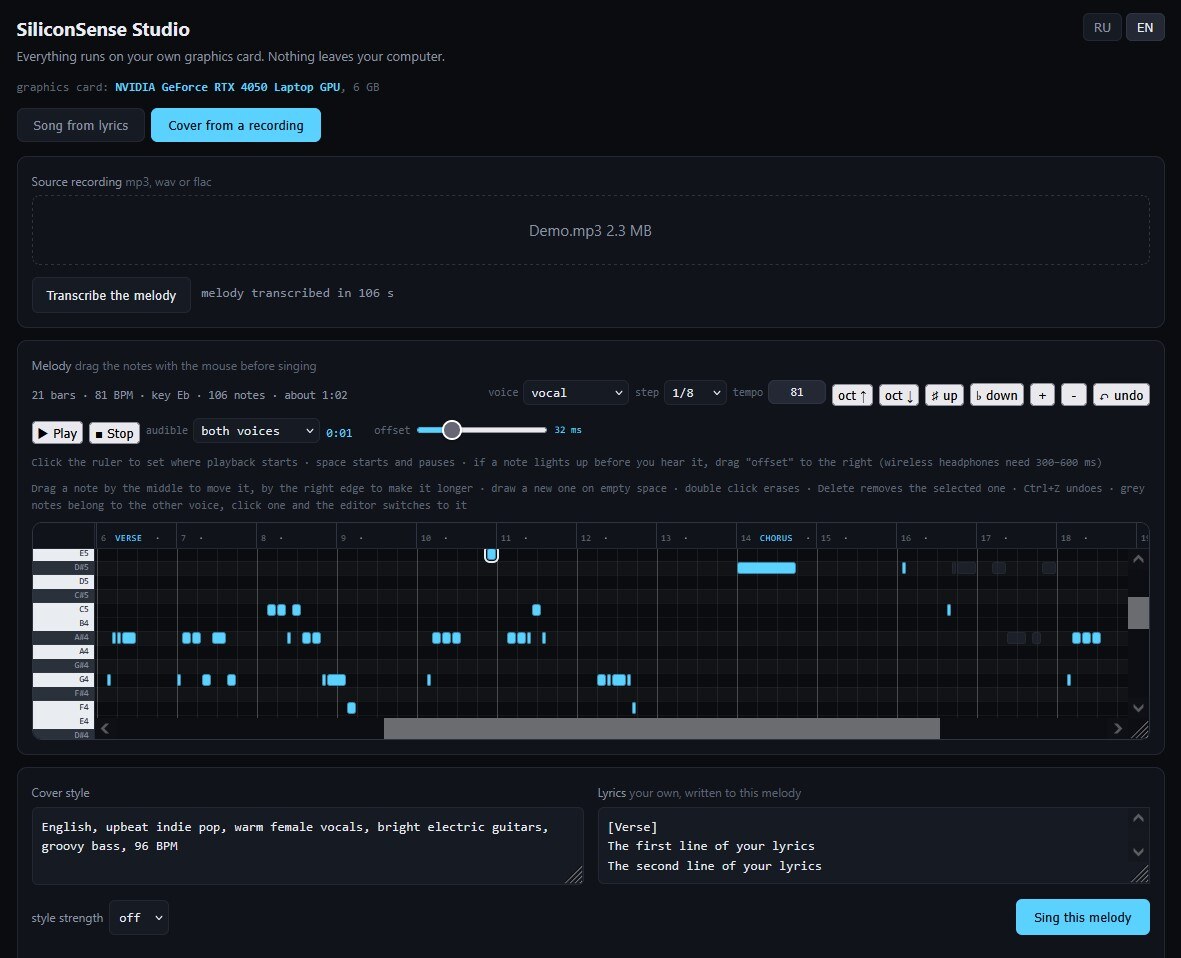
Why covers used to stop at 2:00
The old cover interface omitted the duration, leaving the server’s 120-second default in effect. Version 1.2.0 calculates the budget from the current score and tempo in Follow the score mode, adding five seconds for the ending. A 4:00 score gets a 4:05 budget.
The manual limit accepts 1–900 seconds. It is a maximum, not a promised song length; the model can finish earlier. If model context is exhausted, increasing seconds will not fix it. Shorten the lyrics or score, or work in parts. This build does not automatically join those parts.
Update without downloading the models again
- Close the studio and console.
- Keep a backup of your studio folder and songs.
- Copy the new studio folder’s contents over the existing installation, including
duration.pyandengine_nodes. - Keep
engine,.venv,toolsandsongs. - Run
start.batand refresh the browser tab.
What has been measured
The README records earlier laptop RTX 4050 6 GB results with driver 581: 61 seconds for one minute of music, 118 seconds for two minutes, 106 seconds to transcribe a melody and 130 seconds to sing a two-minute cover. These are separate operations, not total end-to-end cover time.
This update has no new GPU benchmark for 3–6 minute generations. Automated tests cover duration calculations, job construction and the interface. Our Russian lyrics test on an A40 is a different experiment; its figures do not describe laptop performance.
Troubleshooting
- No browser window: check whether installation has finished in the console and save any error text.
- Out of VRAM: close other GPU applications and begin with a shorter excerpt.
- Another cutoff: check the manual limit, whether all files were updated, and the completion message. A duration cutoff and exhausted context are different problems.
- The tune changed: check the transcribed notes, chord mode and syllable fitting before changing generation settings.
The wrapper and model have separate licences
Our wrapper code is MIT licensed. Model weights are not included in the archive and download from their owners’ repositories. Check the model terms before commercial use; the wrapper licence does not grant commercial rights to the weights.