Suno not following your style? Check the “My Taste” setting
Sound familiar: you ask for one style, and Suno keeps drifting to its "own" — same genres, same vocals, "as usual". Usually it is not the prompt but the My Taste personalization. Below is how to find and turn it off in a couple of clicks (with screenshots).
Why Suno keeps missing the style
My Taste in Suno is on by default. It quietly biases generations toward your taste — based on what you listened to, liked and created. The shorter and vaguer your style prompt, the more Suno fills in your personal preferences instead of the requested style. Hence the feeling that the model "won't listen".
Step 1. Open the My Taste setting
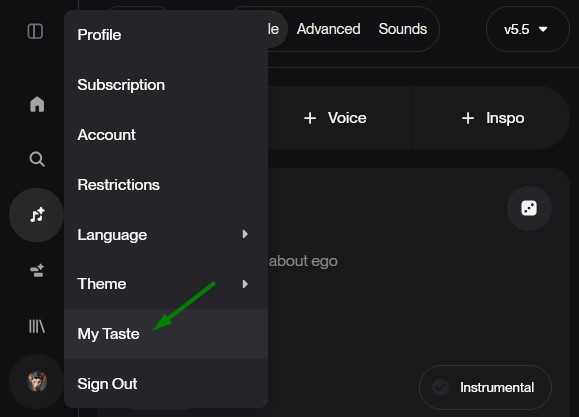
Click your avatar in Suno — in the dropdown menu pick My Taste.
Step 2. Turn off “My Styles” and/or edit the profile
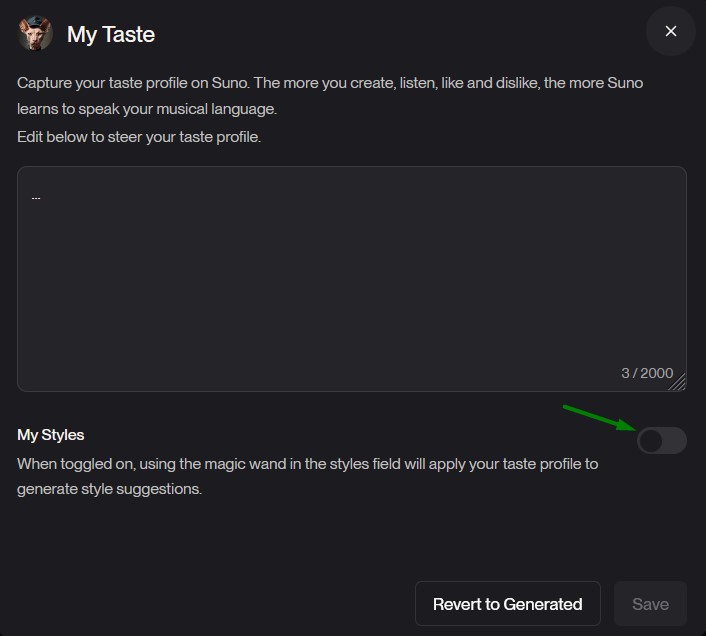
In the panel that opens there is a My Styles toggle. When it is on, the magic wand in the styles field applies your taste profile to the suggestions. Turn it off — and Suno stops mixing your preferences into the style. You can also edit the taste-profile text (or hit "Revert to Generated"), then Save.
Step 3. Write a specific style prompt
The main lever is a detailed prompt: it overrides My Taste regardless. Specify in order: genre → era → instruments with adjectives → vocal type → tempo (BPM). A vague "pop, energetic" hands the decision back to personalization, while specifics make Suno obey.